

Latest Version
October 08, 2024
Netflix, Inc.
Trivia
iOS
0
Report a Problem
More About :game
What Is Heads Up! Netflix Edition?
Heads Up! Netflix Edition turns a simple guessing game into an energetic party experience.
The concept is easy: one person guesses while everyone else gives clues.
The player holding the device cannot see the word displayed on the screen. Instead, friends have to describe, act out or hint at the answer without directly saying it.
When the answer is guessed, the player tilts the device down to move forward. If the word is too difficult, tilting the device up skips to another one.
This simple control system means almost anyone can join a game within seconds.
How to Play Heads Up! Netflix Edition
A typical round works like this:
- Choose a category or deck.
- Give the device to the guessing player.
- Hold the phone or tablet against the player's forehead.
- The screen displays a hidden word or phrase.
- Friends provide clues without saying the answer directly.
- Tilt down after a correct guess.
- Tilt up to skip a difficult word.
- Continue until the round ends.
- Compare how many answers the player managed to guess.
The result is fast, loud and often hilarious.
The Forehead Gameplay Mechanic
The most recognizable part of Heads Up! is its forehead-based gameplay.
Instead of passing the device around and looking at the screen, the guessing player holds it facing outward. Everyone else can see the answer while the player cannot.
This creates an immediate social dynamic.
The clue-givers may start shouting suggestions, acting out movements or trying increasingly creative descriptions while the guessing player attempts to figure out the answer.
Tilt Controls
The game uses simple motion controls to keep the action moving.
Tilt Down
Tilt the device down after correctly guessing the word to continue to the next card.
Tilt Up
Tilt the device up when you are stuck and want to skip the current word.
This eliminates the need to repeatedly touch small buttons while holding the device against your forehead.
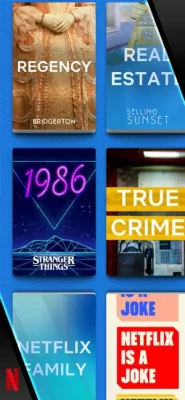
Netflix-Themed Decks
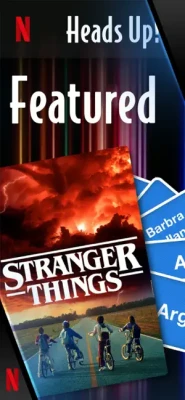
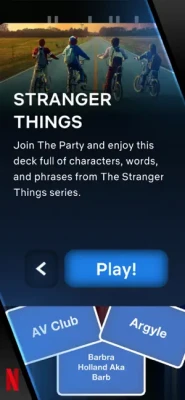
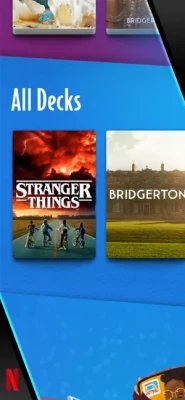
One of the main differences between the Netflix Edition and a generic guessing game is its collection of decks based on Netflix titles.
This gives Netflix fans an opportunity to test how well their friends remember characters, shows and other familiar references.
The themed approach can work particularly well when everyone in the group watches similar Netflix content.
Party Game Experience
Heads Up! is designed primarily for social play.
It works especially well when several people are in the same room because the clues, reactions and mistakes become part of the entertainment.
A technically perfect guessing round isn't necessarily the most enjoyable one. Often, the funniest moments happen when everyone gives terrible clues or the player confidently guesses something completely unrelated.
Multiplayer Gameplay
Netflix officially categorizes Heads Up! as a multiplayer party game. It is available on Android phones and tablets as well as iPhone, iPad and iPod touch.
There isn't a complicated matchmaking system to learn. The game is built around people physically playing together.
That makes it particularly suitable for:
- Family gatherings
- Parties
- Game nights
- Sleepovers
- Holidays
- School or youth activities
- Casual gatherings with friends
Categories and Guessing
Choosing the right category can make a major difference.
A category that everyone understands can produce rapid-fire rounds, while a highly specialized Netflix deck may require players to know the relevant show or movie.
For a mixed group, broader categories are generally easier.
For a group of dedicated Netflix fans, themed decks can make the game much more entertaining.
Saving Gameplay Videos
One of the game's useful party features is the ability to save videos of the gameplay.
That means funny reactions and particularly chaotic rounds can become short clips that players can keep or share.
This adds another layer to the experience because the game isn't only about scoring points—the reactions themselves can become part of the entertainment.
Family-Friendly Party Fun
The U.S. App Store currently gives Heads Up! Netflix Edition a 4+ age rating.
The straightforward guessing format makes it accessible to a broad audience, although the suitability of individual Netflix-themed decks can depend on the content being referenced.
Beginner's Guide
1. Choose a Familiar Category
If you're playing with new participants, start with something most people understand.
2. Give Clear Clues
Avoid overly complicated explanations.
If the answer is something recognizable, describe its purpose, appearance or context.
3. Don't Say the Answer
The challenge is to communicate without directly giving away the word.
4. Use Actions
If verbal clues aren't working, physical gestures can sometimes make the answer obvious.
5. Keep Moving
Don't spend too much time on one difficult card.
If nobody knows the answer, use the skip control and move forward.
Advanced Clue-Giving Strategies
Think About Associations
Instead of describing the word directly, think about related ideas.
For example, if the answer is a movie character, you could describe the character's role, setting or famous traits.
Use Multiple Clues
One clue may not be enough. Combining several small hints can help the guessing player make the connection.
Match the Player
Some people respond better to visual clues while others prefer verbal descriptions.
Adjust your strategy depending on who is guessing.
Don't Overcomplicate Things
A clue can become useless if it requires a long explanation.
Short, clear hints often work better.
Coordinate as a Team
If several people are providing clues, avoid everyone shouting different ideas at once.
One organized clue can be more useful than five contradictory ones.
Controls and Interface
The controls are intentionally minimal.
The primary interaction involves tilting the device rather than navigating complicated menus during a round.
This is important because the guessing player may be holding the device against their forehead while concentrating on the clues coming from everyone around them.
iPhone and iPad Compatibility
Heads Up! Netflix Edition supports both iPhone and iPad.
The current U.S. App Store listing requires iOS 16.0 or later for iPhone and iPadOS 16.0 or later for iPad. The listed app size is approximately 264.4 MB.
Netflix currently recommends iOS 17 and iPadOS 17 or later for the best overall Netflix Games experience.
Offline Gameplay
Netflix officially lists offline play as supported, although some features require an internet connection.
An internet connection is still required to download and install the game.
This is useful for parties where reliable internet isn't guaranteed, although players should connect beforehand if they need online-dependent features.
Cloud Save Support
Heads Up! Netflix Edition does not use cloud saves.
Netflix states that if you uninstall the game or play on a different device, the game starts from the beginning.
This isn't a major issue for a party game because its core experience doesn't depend heavily on long-term progression.
Netflix Membership
The game is available exclusively to Netflix members. The App Store listing currently shows Netflix membership as the relevant in-app purchase option.
For existing Netflix subscribers, this means the game can be added to a game-night library without purchasing a separate traditional copy of the title.
Languages
Heads Up! Netflix Edition supports English plus 13 additional languages on the current U.S. App Store listing, including:
- Arabic
- French
- German
- Italian
- Japanese
- Korean
- Polish
- Portuguese
- Spanish
- Swedish
- Thai
- Traditional Chinese
- Turkish
This makes it more accessible for international groups.
Technical Details
| Detail | Information |
|---|---|
| Game | Heads Up! Netflix Edition |
| Developer | Netflix, Inc. |
| Developers listed by Netflix | Ellen Digital Ventures, Gasket Games |
| Genre | Party / Trivia / Guessing |
| Game Type | Multiplayer |
| Platforms | iPhone, iPad, iPod touch, Android |
| Minimum iOS | iOS 16.0 |
| Minimum iPadOS | iPadOS 16.0 |
| App Size | About 264.4 MB |
| Age Rating | 4+ |
| Offline Play | Yes, some features require internet |
| Cloud Saves | No |
| Languages | English + 13 more |
| Netflix Membership | Required |
The current App Store and Netflix support pages provide the platform, compatibility, language and gameplay information above.
Updates and What's New
The current App Store version history lists version 1.0.22, released October 22, 2024.
The update focused on bug fixes and performance improvements. Earlier releases also included performance fixes, while version 1.0.7 added new content updates.
Because app versions can change, the live App Store listing should be checked for the newest release before publishing a technical specification permanently.
Player Reception
The current U.S. App Store listing shows a 3.2/5 rating from 57 ratings.
Player opinions are mixed.
Some users enjoy the game as a family and friends party experience, while other reviews criticize the relatively limited selection of decks and occasional difficulty with the tilt controls.
This makes the game particularly dependent on what a group expects from a party game. Players looking for a quick social activity may appreciate its simplicity, while longtime Heads Up! users may compare the Netflix Edition with older versions and expect a larger variety of categories.
Pros and Cons
Pros
- Extremely easy to learn
- Excellent for groups
- Fast-paced rounds
- Simple tilt controls
- Netflix-themed decks
- Multiplayer party gameplay
- Supports iPhone and iPad
- Offline play available
- Gameplay video recording
- Broad language support
- Family-friendly rating
- Good choice for game nights
Cons
- Netflix membership required
- Limited long-term progression
- No cloud saves
- Some players report inconsistent tilt recognition
- Current App Store rating is mixed
- Netflix-focused decks may not appeal to everyone
- Requires people to physically play together
Who Should Play Heads Up! Netflix Edition?
This game is best suited to players who enjoy:
- Party games
- Guessing games
- Charades
- Family games
- Trivia games
- Multiplayer mobile games
- Netflix-themed games
- Social games
- Casual game nights
It is particularly effective when played with several people in the same room.
Who May Not Enjoy It?
Heads Up! Netflix Edition may not be ideal if you're looking for:
- A single-player campaign
- Deep strategic gameplay
- RPG progression
- Competitive online matchmaking
- Extensive customization
- Long-term character progression
- Complex puzzle mechanics
The game succeeds through social interaction rather than mechanical depth.
Comparison With Traditional Heads Up!
The fundamental concept remains familiar: one player holds the device against their forehead while friends provide clues.
The Netflix Edition's main identity comes from its Netflix-themed content and integration into Netflix Games.
That makes it especially attractive to subscribers who want a casual party game connected to shows and entertainment they already know.
Best Situations to Play
Family Game Night
The straightforward rules make it easy for different age groups to participate.
Parties
Fast rounds mean players can rotate frequently without anyone being stuck waiting for long.
Holiday Gatherings
A phone or tablet can quickly become the center of a group activity.
Friends' Night
Netflix-themed categories can create an additional challenge when everyone watches the same shows.
Casual Breaks
You don't need to prepare a complicated gaming setup. Pick a category and start playing.
Expert Rating
Overall: 8.2/10
Party Fun: 9/10
Accessibility: 9.5/10
Controls: 8.5/10
Multiplayer: 9/10
Content Variety: 7/10
Replay Value: 8/10
Presentation: 8/10
Mobile Experience: 8.5/10
The game's strongest feature is its ability to turn a single phone or tablet into an instant group activity.
Its biggest limitation is content variety, particularly for players who expect a huge selection of categories.
Frequently Asked Questions
What is Heads Up! Netflix Edition?
It is a multiplayer party guessing game where one player holds a device against their forehead and tries to identify words or phrases while friends provide clues.
Can I play Heads Up! Netflix Edition on iPad?
Yes. The game supports iPad and currently requires iPadOS 16.0 or later according to the U.S. App Store listing.
Is Heads Up! Netflix Edition multiplayer?
Yes. Netflix classifies it as a multiplayer party game.
How do you play Heads Up! Netflix Edition?
Choose a category, hold the device against your forehead and have your friends describe the word shown on the screen. Tilt down after a correct answer or tilt up to skip.
How do you skip a word?
Tilt the device upward to skip to another word.
How do you confirm a correct answer?
Tilt the device downward to continue to the next word.
Can you record Heads Up! gameplay?
Yes. The App Store listing says players can save videos of the gameplay and share them online.
Can you play Heads Up! Netflix Edition offline?
Yes. Netflix lists offline play as supported, although some features require an internet connection.
Does Heads Up! Netflix Edition have cloud saves?
No. Netflix states that the game does not use cloud saves.
Do I need Netflix to play?
Yes. The game is available exclusively for Netflix members.
What devices support Heads Up! Netflix Edition?
Netflix lists Android phones and tablets, iPhone, iPad and iPod touch as supported platforms.
What is the download size?
The current U.S. App Store listing shows approximately 264.4 MB.
What age rating does Heads Up! Netflix Edition have?
The U.S. App Store currently lists it as 4+.
Does Heads Up! Netflix Edition support Arabic?
Yes. Arabic is one of the supported languages.
Heads Up! Netflix Edition is built around one of the simplest party-game ideas possible: one player sees the answer, everyone else tries to make them guess it.
The clever part is how naturally the mobile device becomes part of the game. Holding the screen against the forehead, tilting down for a correct answer and tilting up to skip creates an intuitive control system that requires almost no explanation.
The Netflix Edition adds themed decks based on Netflix titles, giving subscribers a recognizable twist on the classic guessing format. Its multiplayer design makes it particularly well suited to family gatherings, parties and casual nights with friends.
The experience isn't perfect. The current U.S. App Store rating is 3.2/5 from 57 ratings, and some reviewers have criticized the selection of available decks and occasional problems with tilt controls.
Still, if your goal is a quick, accessible and genuinely social party game for iPhone or iPad, Heads Up! Netflix Edition remains an appealing choice—especially when several people already have a Netflix membership and want something everyone can play together.
Rate the Game
User Reviews






Popular Games



















 Android
 iOS
iOS Windows
 Xbox
Xbox